Wednesday, 28 March 2018

Bootstrap Multi select example


View Model :

using System;
using System.Collections.Generic;
using System.Linq;
using System.Web;
using System.Web.Mvc;

namespace WebApplication1.Models
{
    public class EMPVM
    {
        public int CID { get; set; }
        public List<SelectListItem> LCOUNTRY { get; set; }
        public List< int> SID { get; set; }
        public EMPVM()
        {
            LCOUNTRY = new List<SelectListItem>();
            SID = new List<int>();
        }
    }
}


View code :

@model WebApplication1.Models.EMPVM

@{
    Layout = null;
}

<!DOCTYPE html>

<html>
<head>
    <meta name="viewport" content="width=device-width" />
    <title>Create</title>
</head>
<body>
    @using (Html.BeginForm())
    {
        @Html.AntiForgeryToken()
     
        <div class="form-horizontal">
     
            @Html.ValidationSummary(true, "", new { @class = "text-danger" })
            <div class="form-group">
                @Html.LabelFor(model => model.CID, htmlAttributes: new { @class = "control-label col-md-2" })
                <div class="col-md-10">
                    @Html.ListBoxFor(model => model.SID,Model.LCOUNTRY, new {@class = "form-control" ,@style="width:200px" } )
                    @Html.ValidationMessageFor(model => model.CID, "", new { @class = "text-danger" })
                </div>
            </div>
 
            <br /><br />
            <div class="form-group">
                <div class="col-md-offset-2 col-md-10">
                    <input type="submit" value="Create" class="btn btn-default" />
                </div>
            </div>
        </div>
    }
 
 
</body>
</html>
<link rel="stylesheet" href="~/bootstrap-3.3.2.min.css" />
<link rel="stylesheet" href="~/bootstrap-multiselect.css" />
<script src="~/scripts/jquery-1.12.4.min.js"></script>
<script src="~/scripts/bootstrap-3.3.2.min.js"></script>
<script src="~/scripts/bootstrap-multiselect.js"></script>

<script type="text/javascript">
    $(function () {
        $('#SID').multiselect();
    });
</script>

Reset Multiselect :

$('#SID option:selected').each(function () {
                $(this).prop('selected', false);
            })


            $('#SID').multiselect('refresh');

Multiselect with autocomplete example

Press Me


using System;
using System.Collections.Generic;
using System.Linq;
using System.Web;
using System.Web.Mvc;

namespace WebApplication1.Models
{
    public class EMPVM
    {
        public int CID { get; set; }
        public List<SelectListItem> LCOUNTRY { get; set; }
        public List< int> SID { get; set; }
        public EMPVM()
        {
            LCOUNTRY = new List<SelectListItem>();
            SID = new List<int>();
        }
    }
}

View code :

@model WebApplication1.Models.EMPVM

@{
    Layout = null;
}

<!DOCTYPE html>

<html>
<head>
    <meta name="viewport" content="width=device-width" />
    <title>Create</title>
</head>
<body>
    @using (Html.BeginForm())
    {
        @Html.AntiForgeryToken()
       
        <div class="form-horizontal">
     
            @Html.ValidationSummary(true, "", new { @class = "text-danger" })
            <div class="form-group">
                @Html.LabelFor(model => model.CID, htmlAttributes: new { @class = "control-label col-md-2" })
                <div class="col-md-10">
                    @Html.ListBoxFor(model => model.SID,Model.LCOUNTRY, new {@class = "form-control" ,@style="width:200px" } )
                    @Html.ValidationMessageFor(model => model.CID, "", new { @class = "text-danger" })
                </div>
            </div>
   
            <br /><br />
            <div class="form-group">
                <div class="col-md-offset-2 col-md-10">
                    <input type="submit" value="Create" class="btn btn-default" />
                </div>
            </div>
        </div>
    }
   
 
</body>
</html>
<link rel="stylesheet" href="~/chosen.css" />
<script src="~/scripts/jquery-1.12.4.min.js"></script>
<script src="~/scripts/chosen.jquery.js"></script>
<script src="~/scripts/chosen.proto.js"></script>
<script type="text/javascript">
    $(function () {
        $('#SID').chosen();
    });
</script>

Drop down with autocomplete Example


View Model  :

using System;
using System.Collections.Generic;
using System.Linq;
using System.Web;
using System.Web.Mvc;

namespace WebApplication1.Models
{
    public class EMPVM
    {
        public int CID { get; set; }
        public List<SelectListItem> LCOUNTRY { get; set; }
        public List< int> SID { get; set; }
        public EMPVM()
        {
            LCOUNTRY = new List<SelectListItem>();
            SID = new List<int>();
        }
    }
}

View code.

@model WebApplication1.Models.EMPVM

@{
    Layout = null;
}

<!DOCTYPE html>

<html>
<head>
    <meta name="viewport" content="width=device-width" />
    <title>Create</title>
</head>
<body>
    @using (Html.BeginForm()) 
    {
        @Html.AntiForgeryToken()
        
        <div class="form-horizontal">
       
            @Html.ValidationSummary(true, "", new { @class = "text-danger" })
            <div class="form-group">
                @Html.LabelFor(model => model.CID, htmlAttributes: new { @class = "control-label col-md-2" })
                <div class="col-md-10">
                    @Html.DropDownListFor(model => model.CID,Model.LCOUNTRY,"Select...", new {@class = "form-control" ,@style="width:200px" } )
                    @Html.ValidationMessageFor(model => model.CID, "", new { @class = "text-danger" })
                </div>
            </div>
    
            <br /><br />
            <div class="form-group">
                <div class="col-md-offset-2 col-md-10">
                    <input type="submit" value="Create" class="btn btn-default" />
                </div>
            </div>
        </div>
    }
    
   
</body>
</html>
<link rel="stylesheet" href="~/chosen.css" />
<script src="~/scripts/jquery-1.12.4.min.js"></script>
<script src="~/scripts/chosen.jquery.js"></script>
<script src="~/scripts/chosen.proto.js"></script>
<script type="text/javascript">
    $(function () {
        $('#CID').chosen();
    });
</script>

Reset Dropdown Code :

$('#CID').val('').trigger('chosen:updated');

Sunday, 18 March 2018

CURD oration with multiple delete using angular js & web api.


WEB API :

using System;
using System.Collections.Generic;
using System.Data.Entity;
using System.Linq;
using System.Net;
using System.Net.Http;
using System.Web.Http;
using WebApplication4.Models;

namespace WebApplication4.Controllers
{
    [RoutePrefix("api/Empservices")]
    public class EmpservicesController : ApiController
    {
        [Route("Countries")]
        [HttpGet]
        public IHttpActionResult Countries()
        {
            try
            {
                using (Database1Entities obj = new Models.Database1Entities())
                {
                    var data = obj.COUNTRies.ToList();
                    if (data.Count > 0)
                        return Ok(data);
                    else
                        return Content(HttpStatusCode.NoContent, "Data not availeble.");
                }
            }
            catch (Exception ex)
            {
                return BadRequest(ex.Message);
            }
           
        }
        [Route("States/{CID:int}")]
        [HttpGet]
        public IHttpActionResult States(int CID)
        {
            try
            {
                using (Database1Entities obj = new Models.Database1Entities())
                {
                    var data = obj.STATEs.Where(m=>m.CID==CID).ToList();
                    if (data.Count > 0)
                        return Ok(data);
                    else
                        return Content(HttpStatusCode.NoContent, "Data not availeble.");
                }
            }
            catch (Exception ex)
            {
                return BadRequest(ex.Message);
            }

        }
        [Route("Hobbies")]
        [HttpGet]
        public IHttpActionResult Hobbies()
        {
            try
            {
                using (Database1Entities obj = new Models.Database1Entities())
                {
                    var data = obj.HOBBies.ToList();
                    if (data.Count > 0)
                        return Ok(data);
                    else
                        return Content(HttpStatusCode.NoContent, "Data not availeble.");
                }
            }
            catch (Exception ex)
            {
                return BadRequest(ex.Message);
            }

        }
        [Route("Emps")]
        [HttpGet]
        public IHttpActionResult Emps()
        {
            try
            {
                using (Database1Entities obj = new Models.Database1Entities())
                {
                    var data = obj.EMPs.ToList();
                    if (data.Count > 0)
                        return Ok(data);
                    else
                        return Content(HttpStatusCode.NoContent, "Data not availeble.");
                }
            }
            catch (Exception ex)
            {
                return BadRequest(ex.Message);
            }

        }
        [Route("Emp/{EID:int}",Name ="Emp")]
        [HttpGet]
        public IHttpActionResult Emp(int EID)
        {
            try
            {
                using (Database1Entities obj = new Models.Database1Entities())
                {
                    var data = obj.EMPs.Where(m => m.EID == EID).Select(p => new EMPVM { EID = p.EID, NAME = p.NAME, ADDRESS = p.ADDRESS, PASSWORD = p.PASSWORD, GENDER = p.GENDER, CID = p.CID, SID = p.SID, HLIST = obj.EMPMAPs.Where(t => t.EID == EID).Select(v => v.HID.Value).ToList() }).FirstOrDefault();
                    if (data!=null)
                        return Ok(data);
                    else
                        return Content(HttpStatusCode.NoContent, "Data not availeble.");
                }
            }
            catch (Exception ex)
            {
                return BadRequest(ex.Message);
            }

        }
        [Route("Save")]
        [HttpPost]
        public IHttpActionResult Save([FromBody]EMPVM eMPVM)
        {
            try
            {
                using (Database1Entities obj = new Models.Database1Entities())
                {
                    var data = eMPVM;
                    if (data != null)
                    {
                        EMP emp = new EMP();
                        emp.EID = eMPVM.EID;
                        emp.NAME = eMPVM.NAME;
                        emp.ADDRESS = eMPVM.ADDRESS;
                        emp.PASSWORD = eMPVM.PASSWORD;
                        emp.GENDER = eMPVM.GENDER;
                        emp.CID = eMPVM.CID;
                        emp.SID = eMPVM.SID;
                        obj.Entry(emp).State = EntityState.Added;
                        obj.SaveChanges();
                        obj.EMPMAPs.AddRange(eMPVM.HLIST.Select(p => new EMPMAP { EID = eMPVM.EID, HID = p }).ToList());
                        obj.SaveChanges();
                        return Created(new Uri(Url.Link("Emp", new { EID = eMPVM.EID })), "Data Saved.");
                    }
                    else
                        return Content(HttpStatusCode.NoContent, "Data not availeble.");
                }
            }
            catch (Exception ex)
            {
                return BadRequest(ex.Message);
            }

        }
        [Route("Update/{EID:int}")]
        [HttpPut]
        public IHttpActionResult Update([FromUri]int EID,[FromBody]EMPVM eMPVM)
        {
            try
            {
                using (Database1Entities obj = new Models.Database1Entities())
                {
                    var data = eMPVM;
                    if (data != null)
                    {
                        EMP emp = obj.EMPs.Find(EID);
                        emp.NAME = eMPVM.NAME;
                        emp.ADDRESS = eMPVM.ADDRESS;
                        emp.PASSWORD = eMPVM.PASSWORD;
                        emp.GENDER = eMPVM.GENDER;
                        emp.CID = eMPVM.CID;
                        emp.SID = eMPVM.SID;
                        obj.Entry(emp).State = EntityState.Modified;
                        obj.SaveChanges();
                        obj.EMPMAPs.RemoveRange(obj.EMPMAPs.Where(m => m.EID == EID));
                        obj.SaveChanges();
                        obj.EMPMAPs.AddRange(eMPVM.HLIST.Select(p => new EMPMAP { EID = eMPVM.EID, HID = p }).ToList());
                        obj.SaveChanges();
                        return Ok("Data Updated.");
                    }
                    else
                        return Content(HttpStatusCode.NoContent, "Data not availeble.");
                }
            }
            catch (Exception ex)
            {
                return BadRequest(ex.Message);
            }

        }
        [Route("Delete/{EID:int}")]
        [HttpDelete]
        public IHttpActionResult Delete([FromUri]int EID)
        {
            try
            {
                using (Database1Entities obj = new Models.Database1Entities())
                {
                    EMP data = obj.EMPs.Find(EID);
                    if (data != null)
                    {
                        obj.Entry(data).State = EntityState.Deleted;
                        obj.SaveChanges();
                        obj.EMPMAPs.RemoveRange(obj.EMPMAPs.Where(m => m.EID == EID));
                        obj.SaveChanges();
                        return Ok("Data Deleted.");
                    }
                    else
                        return Content(HttpStatusCode.NoContent, "Data not availeble.");
                }
            }
            catch (Exception ex)
            {
                return BadRequest(ex.Message);
            }

        }
        [Route("Alldelete")]
        [HttpPost]
        public IHttpActionResult Alldelete([FromBody]List<int> listemp)
        {
            try
            {
                using (Database1Entities obj = new Models.Database1Entities())
                {
                   
                    if (listemp.Count>0)
                    {
                        obj.EMPs.RemoveRange(obj.EMPs.Where(t => listemp.Contains(t.EID)));
                        obj.SaveChanges();
                        obj.EMPMAPs.RemoveRange(obj.EMPMAPs.Where(m => listemp.Contains(m.EID.Value)));
                        obj.SaveChanges();
                        return Ok("Data Deleted.");
                    }
                    else
                        return Content(HttpStatusCode.NoContent, "Data not availeble.");
                }
            }
            catch (Exception ex)
            {
                return BadRequest(ex.Message);
            }

        }


    }
}


Angular js :


AddorEdit page :

<div class="modal-header">
    <button type="button" ng-click="cancel()" class="close" data-dismiss="modal">&times;</button>
    <h4>Employee Details</h4>
</div>
<div class="modal-body">
    <form class="form-horizontal" novalidate name="frmEmp">
        <div class="form-group" ng-class="{'has-error':frmEmp.txtEid.$invalid,'has-success':frmEmp.txtEid.$valid}">
            <label class="control-label col-lg-2">EID</label>
            <div class="col-lg-6">
                <input type="text" class="form-control" ng-model="EMP.EID" required name="txtEid" />
            </div>
            <div class="help-block has-error" ng-show="frmEmp.txtEid.$invalid && frmEmp.txtEid.$touched">
                Eid should not blank.
            </div>
        </div>
        <div class="form-group" ng-class="{'has-error':frmEmp.txtName.$invalid,'has-success':frmEmp.txtName.$valid}">
            <label class="control-label col-lg-2">NAME</label>
            <div class="col-lg-6">
                <input type="text" class="form-control" ng-model="EMP.NAME" required name="txtName" />
            </div>
            <div class="help-block has-error" ng-show="frmEmp.txtName.$invalid && frmEmp.txtName.$touched">
                Name should not blank.
            </div>
        </div>
        <div class="form-group" ng-class="{'has-error':frmEmp.txtAdd.$invalid,'has-success':frmEmp.txtAdd.$valid}">
            <label class="control-label col-lg-2">ADDRESS</label>
            <div class="col-lg-6">
                <textarea  class="form-control" ng-model="EMP.ADDRESS" required name="txtAdd" ></textarea>
            </div>
            <div class="help-block has-error" ng-show="frmEmp.txtAdd.$invalid && frmEmp.txtAdd.$touched">
                Address should not blank.
            </div>
        </div>

        <div class="form-group" ng-class="{'has-error':frmEmp.txtPwd.$invalid,'has-success':frmEmp.txtPwd.$valid}">
            <label class="control-label col-lg-2">PASSWORD</label>
            <div class="col-lg-6">
                <input type="password" class="form-control" ng-model="EMP.PASSWORD" required name="txtPwd" ng-minlength="6" ng-maxlength="8" />
            </div>
            <div class="help-block has-error">
                <div ng-show="frmEmp.txtPwd.$error.required && frmEmp.txtPwd.$touched">
                    Passwrod should not blank.
                </div>
                <div ng-show="frmEmp.txtPwd.$error.minlength && frmEmp.txtPwd.$touched">
                    Passwrod min length 6.
                </div>
                <div ng-show="frmEmp.txtPwd.$error.maxlength && frmEmp.txtPwd.$touched">
                    Passwrod min length 8.
                </div>
            </div>
        </div>
        <div class="form-group" ng-class="{'has-error':frmEmp.ddlgender.$invalid,'has-success':frmEmp.ddlgender.$valid}">
            <label class="control-label col-lg-2">GENDER</label>
            <div class="col-lg-6">
               <select ng-model="EMP.GENDER" class="form-control" required name="ddlgender">
                   <option value="">Select</option>
                   <option value="Male">Male</option>
                   <option value="Female">Female</option>
               </select>
            </div>
            <div class="help-block has-error" ng-show="frmEmp.ddlgender.$invalid && frmEmp.ddlgender.$touched">
                Please select a gender.
            </div>
        </div>
        <div class="form-group" ng-class="{'has-error':frmEmp.ddlcid.$invalid,'has-success':frmEmp.ddlcid.$valid}">
            <label class="control-label col-lg-2">COUNTRY</label>
            <div class="col-lg-6">
                <select ng-model="EMP.CID" class="form-control" required name="ddlcid" ng-options="c.CID as c.CNAME for c in listc" ng-change="fillddl()">
                    <option value="">Select</option>
                </select>
            </div>
            <div class="help-block has-error" ng-show="frmEmp.ddlcid.$invalid && frmEmp.ddlcid.$touched">
                Please select a country.
            </div>
        </div>
        <div class="form-group" ng-class="{'has-error':frmEmp.ddlsid.$invalid,'has-success':frmEmp.ddlsid.$valid}">
            <label class="control-label col-lg-2">STATE</label>
            <div class="col-lg-6">
                <select ng-model="EMP.SID" class="form-control" required name="ddlsid" ng-options="c.SID as c.SNAME for c in lists">
                    <option value="">Select</option>
                </select>
            </div>
            <div class="help-block has-error" ng-show="frmEmp.ddlsid.$invalid && frmEmp.ddlsid.$touched">
                Please select a state.
            </div>
        </div>
        <div class="form-group" ng-class="{'has-error':frmEmp.ddlhid.$invalid,'has-success':frmEmp.ddlhid.$valid}">
            <label class="control-label col-lg-2">HOBBY</label>
            <div class="col-lg-6">
                <select ng-model="EMP.HLIST" multiple class="form-control" required name="ddlhid" ng-options="c.HID as c.HNAME for c in listh">
                  
                </select>
            </div>
            <div class="help-block has-error" ng-show="frmEmp.ddlhid.$invalid && frmEmp.ddlhid.$touched">
                Please select a hobby.
            </div>
        </div>
    </form>

</div>
<div class="modal-footer">
    <div class="form-group">
        <input type="button" class="btn btn-primary" value="Save" ng-click="save()" style="width:80px">
        <input type="button" class="btn btn-primary" value="Cancel" ng-click="cancel()" style="width:80px">
    </div>
</div>


Index page :

<!DOCTYPE html>
<html ng-app="app">
<head>
    <title></title>
    <meta charset="utf-8" />
    <style>
        thead {
            background-color: #3276b1;
            color: #fff;
            border-color: 285e8e;
        }
    </style>
    <link rel="stylesheet" href="Content/bootstrap.min.css" />
    <link rel="stylesheet" href="Content/bootstrap-theme.min.css" />
    <link rel="stylesheet" href="Content/styles.css" />
    <link rel="stylesheet" href="Content/Site.css" />
    <link rel="stylesheet" href="Content/jquery.dataTables.min.css" />
    <link rel="stylesheet" href="Content/jquery.dataTables_themeroller.css" />
    <script type="text/javascript" src="Scripts/jquery-1.10.2.js"></script>
    <script type="text/javascript" src="Scripts/jquery.dataTables.js"></script>
    <script type="text/javascript" src="Scripts/angular.js"></script>
    <script type="text/javascript" src="Scripts/angular-datatables.js"></script>
    <script type="text/javascript" src="Scripts/ui-bootstrap.js"></script>
    <script type="text/javascript" src="Scripts/ui-bootstrap-tpls.js"></script>
</head>
<body>
    <div class="container" ng-controller="Ctrl">
        <div class="row col-xs-12">
            <input type="button" class="btn btn-primary" value="Add New" ng-click="openPop()" />
            
        </div><br />
        <div class="row col-xs-12" style="border:solid 1px #000000;height:auto;width:auto;">
            <br />
            <table id="dt" datatable="" dt-options="dtOptions" dt-columns="dtColumns" class="table table-bordered table-hover table-condensed table-responsive table-striped"></table>
        </div><br />
        <div class="row col-xs-12">
            <input type="button" class="btn btn-primary" value="Delete All" ng-click="delAll()" />
        </div>

    </div>
</body>
</html>
<script type="text/javascript">
    angular.module("app", ["datatables", "ui.bootstrap"])
    .controller("Ctrl", function ($scope, empFactory, $uibModal, $compile, $window, DTOptionsBuilder, DTColumnBuilder) {
        $scope.openPop = function () {
            op(0);
        }
        function op(s)
        {
            $uibModal.open({
                templateUrl: 'AddorEdit.html',
                controller: EmpCtrl,
                size: 'lg',
                resolve: {
                    Id: s
                }

            });

        }
        function fill() {
            $scope.arr = [];
            $scope.selected = {};
            $scope.selectAll = false;
            $scope.toggleAll = toggleAll;
            $scope.toggleOne = toggleOne;
            var titleHtml = '<input type="checkbox" ng-model="selectAll" ng-click="toggleAll(selectAll, selected)">';

            $scope.dtColumns = [
                DTColumnBuilder.newColumn(null).withTitle(titleHtml).notSortable()
                .renderWith(function (data, type, full, meta) {
                    $scope.selected[full.EID] = false;
                    return '<input type="checkbox" ng-model="selected[' + data.EID + ']" ng-click="toggleOne(selected)">';
                }).withClass("text-center"),
        DTColumnBuilder.newColumn('EID').withTitle('EID'),
        DTColumnBuilder.newColumn("NAME", "NAME"),
        DTColumnBuilder.newColumn(null).withTitle('ACTION').notSortable()
           .renderWith(function (data, type, full, meta) {
               return '<button class="glyphicon glyphicon-edit" ng-click="edit(' + data.EID + ')">' +
                '</button>&nbsp;' +
                '<button class="glyphicon glyphicon-remove" ng-click="delete(' + data.EID + ')">' +
                '</button>';
           })
            ]
            $scope.dtOptions = DTOptionsBuilder.newOptions()
                .withOption('responsive', true)
                .withOption("bProcessing", true)
                .withOption('bFilter', true)
                .withOption('ajax', {
                    url: "http://localhost:9742/api/Empservices/Emps",
                    type: "Get",
                    catch: false
                })
            .withOption('aLengthMenu', [[2, 10, 25, 50, -1], [2, 10, 25, 50, "All"]])
            .withPaginationType('full_numbers')
            .withDisplayLength(2)
           .withOption('headerCallback', function (header) {
               if (!$scope.headerCompiled) {
                   $scope.headerCompiled = true;
                   $compile(angular.element(header).contents())($scope);
               }
           })
             .withOption('createdRow', function (row, data, dataIndex) {
                 $compile(angular.element(row).contents())($scope);
             });
            function toggleAll(selectAll, selectedItems) {
                for (var id in selectedItems) {

                    if (selectedItems.hasOwnProperty(id)) {
                        selectedItems[id] = selectAll;

                    }
                }
            }
            function toggleOne(selectedItems) {
                for (var id in selectedItems) {
                    if (selectedItems.hasOwnProperty(id)) {
                        if (!selectedItems[id]) {
                            $scope.selectAll = false;
                            return;
                        }


                    }
                }
                $scope.selectAll = true;
            }

        } fill();
        $scope.edit = function (s)
        {
            op(s);
        }
        $scope.delete = function (s)
        {
            if (confirm('Do you want to delete it ?'))
            {
                empFactory.Delete(s).then(function (promise) {
                    alert( promise.data);
                    $window.location.reload(true);
                });

            }
        }
        $scope.delAll = function ()
        {
            angular.forEach($scope.selected, function (i, j) {
                if (i == true) {
                    $scope.arr.push(j);
                }
            });
            if (confirm('Do you want to delete selected items from the list ?')) {
                empFactory.DeleteAll($scope.arr).then(function (promise) {
                    alert(promise.data);
                    $window.location.reload();
                });
            }
        }
        var EmpCtrl = function ($scope, $uibModalInstance, Id) {
            function CLR() {
                $scope.EMP = {
                    EID: null,
                    NAME: null,
                    ADDRESS: null,
                    GENDER: null,
                    CID: null,
                    SID: null,
                    HLIST: []
                }


            }
            if (Id == 0) {
                CLR();
            }
            else {

                empFactory.Get(Id).then(function (promise) {
                    $scope.EMP = promise.data;
                    fx($scope.EMP.CID);
                });
            }
            $scope.save = function () {
                if (Id == 0) {
                    empFactory.Save($scope.EMP).then(function (promise) {
                        alert(promise.data);
                        CLR();
                        $uibModalInstance.close();
                        $window.location.reload(true);
                    });
                }
                else {
                    empFactory.Update($scope.EMP).then(function (promise) {
                        alert(promise.data);
                        CLR();
                        $uibModalInstance.close();
                        $window.location.reload(true);
                    });
                }


            }
            empFactory.Geth().then(function (promise) {
                $scope.listh = promise.data;
            });

            empFactory.Getc().then(function (promise) {
                $scope.listc = promise.data;
            });
            $scope.fillddl = function () {
                fx($scope.EMP.CID);
            }
            function fx(s) {
                empFactory.Gets(s).then(function (promise) {
                    $scope.lists = promise.data;
                });

            }
            $scope.cancel = function () {
                $uibModalInstance.dismiss();
            }
        }
    })
    .factory("empFactory", function ($http) {
        var fac = {};
        fac.Getc = function () {
            return $http.get("http://localhost:9742/api/Empservices/Countries");
        }
        fac.Gets = function (CID) {
            return $http.get("http://localhost:9742/api/Empservices/States/" + CID);
        }
        fac.Geth = function () {
            return $http.get("http://localhost:9742/api/Empservices/Hobbies");
        }
        fac.Gete = function () {
            return $http.get("http://localhost:9742/api/Empservices/Emps");
        }
        fac.Get = function (EID) {
            return $http.get("http://localhost:9742/api/Empservices/Emp/" + EID);
        }
        fac.Save = function (emp) {
            return $http.post("http://localhost:9742/api/Empservices/Save", emp);
        }
        fac.Update = function (emp) {
            return $http.put("http://localhost:9742/api/Empservices/Update/" + emp.EID, emp);
        }
        fac.Delete = function (EID) {
            return $http.delete("http://localhost:9742/api/Empservices/Delete/" + EID);
        }
        fac.DeleteAll = function (lst) {

            return $http.post("http://localhost:9742/api/Empservices/Alldelete", lst);
        }
        return fac;
    })
</script>


Sunday, 11 March 2018

jquery data table with check boxes using MVC


With view model :

@model IEnumerable<WebApplication6.Models.EMP>

@{
    ViewBag.Title = "Index";
    Layout = null;
}

<h2>Index</h2>

<p>
    @Html.ActionLink("Create New", "Create")
</p>
<div style="border:solid 1px #000000; margin-top:2px">
    <br />
    <table class="table table-bordered table-condensed table-hover table-responsive table-striped" id="tb">
        <thead>
            <tr>
                <th><input name="select_all" value="0" id="example-select-all" type="checkbox" /></th>

                <th>
                    @Html.DisplayNameFor(model => model.EID)
                </th>
                <th>
                    @Html.DisplayNameFor(model => model.NAME)
                </th>
                <th>ACTION</th>
            </tr>
        </thead>
        <tbody>
            @foreach (var item in Model)
                <tr>
                    <td>
                        <input type="checkbox" style="width:15px;height:15px" class="cb" value="@item.EID" name="id[]" />
                    </td>
                    <td>
                        @Html.DisplayFor(modelItem => item.EID)
                    </td>
                    <td>
                        @Html.DisplayFor(modelItem => item.NAME)
                    </td>
                    <td>
                        @Html.ActionLink("Edit", "Edit", new { id = item.EID })  |
                        @Html.ActionLink("Delete", "Delete", new { id = item.EID })
                    </td>
                </tr>
            }
        </tbody>
    </table>
</div><br />
<input type="button" value="DeleteAll" id="btndel" />
<link rel="stylesheet" href="~/Content/bootstrap.css" />
<link rel="stylesheet" href="~/Content/Site.css" />
<link rel="stylesheet" href="~/Content/jquery.dataTables.css" />
<link rel="stylesheet" href="~/Content/jquery.dataTables_themeroller.css" />
<script type="text/javascript" src="~/Scripts/jquery-1.10.2.js"></script>
<script type="text/javascript" src="~/Scripts/jquery.dataTables.min.js"></script>

<script type="text/javascript">
    $(function () {

          var table = $("#tb").DataTable({
            "order": [[0, "asc"]],
            "lengthMenu": [[2, 10, 25, 50, -1], [2, 10, 25, 50, "All"]],
            "scroller": true,
            "orderClasses": false,
          })
          $('#example-select-all').on('click', function () {
              // Check/uncheck all checkboxes in the table
              var rows = table.rows({ 'search': 'applied' }).nodes();
              $('input[type="checkbox"]', rows).prop('checked', this.checked);
          });
          $('#tb tbody').on('change', 'input[type="checkbox"]', function () {
              // If checkbox is not checked
              if (!this.checked) {
                  var el = $('#example-select-all').get(0);
                  // If "Select all" control is checked and has 'indeterminate' property
                  if (el && el.checked && ('indeterminate' in el)) {
                      // Set visual state of "Select all" control
                      // as 'indeterminate'
                      el.indeterminate = true;
                  }
              }
          });


          var checkIds = [];
          $('#btndel').click(function () {
              table.$('input[type="checkbox"]').each(function () {
                      if (this.checked) {
                          checkIds.push((this.value));
                  }
              });

              alert(checkIds);


          });


    });
</script>

Without view model :


@{
    ViewBag.Title = "Index";
    Layout = null;
}

<h2>Index</h2>

<div style="border:solid 1px #000000; margin-top:2px">
    <br />
    <table class="table table-bordered table-condensed table-hover table-responsive table-striped" id="example">
        <thead>
            <tr>
                <th><input name="select_all" value="0" id="example-select-all" type="checkbox" /></th>

                <th>
                    EID
                </th>
                <th>
                    NAME
                </th>

            </tr>
        </thead>
        <tbody></tbody>
    </table>
</div>

<input type="button" value="DeleteAll" id="btndel" />
<link rel="stylesheet" href="~/Content/bootstrap.css" />
<link rel="stylesheet" href="~/Content/Site.css" />
<link rel="stylesheet" href="~/Content/jquery.dataTables.css" />
<link rel="stylesheet" href="~/Content/jquery.dataTables_themeroller.css" />
<script type="text/javascript" src="~/Scripts/jquery-1.10.2.js"></script>
<script type="text/javascript" src="~/Scripts/jquery.dataTables.min.js"></script>

<script type="text/javascript">
    $(function () {
        var table;
        $.ajax({
            "url": "@Url.Action("Gets", "Test")",
            type: 'Get',
            datatype: 'json',
            cache: false,
            success: function (Data) {
                table = $('#example').DataTable({
                    data: Data,
                    "pagingType": "full_numbers",
                    "lengthMenu": [[2, 10, 25, 50, -1], [2, 10, 25, 50, "All"]],
                    columns: [
                       {
                           data: "EID",
                           render: function (data, type, full, meta) {
                               return '<input type="checkbox" name="id[]" value="'
                                  + data + '">';
                           }
                       },
                        { data: "EID" },
                        { data: "NAME" }


                    ],
                    select: {
                        style: 'multi'
                    },
                    order: [[1, 'asc']]

                });
            }

        });


        // Handle click on "Select all" control
        $('#example-select-all').on('click', function () {
            // Check/uncheck all checkboxes in the table
            var rows = table.rows({ 'search': 'applied' }).nodes();
            $('input[type="checkbox"]', rows).prop('checked', this.checked);
        });

        $('#example tbody').on('change', 'input[type="checkbox"]', function () {
            // If checkbox is not checked
            if (!this.checked) {
                var el = $('#example-select-all').get(0);
                // If "Select all" control is checked and has 'indeterminate' property
                if (el && el.checked && ('indeterminate' in el)) {
                    // Set visual state of "Select all" control
                    // as 'indeterminate'
                    el.indeterminate = true;
                }
            }
        });

        var checkIds = [];
        $('#btndel').click(function () {
           
            table.$('input[type="checkbox"]').each(function () {
                if (this.checked) {
                    checkIds.push((this.value));
                }
            });

            alert(checkIds);


        });

    });


</script>

Friday, 16 February 2018

TRIGGER


Linq

var m = (from x in obj.EMPs
        select x).ToList();

var m = (from x in obj.EMPs
        where x.EID==1 && x.NAME=="A"
        select x).ToList();

var m = (from x in obj.EMPs
        where x.EID==2 || x.NAME=="A"
        select x).ToList();

var m = (from x in obj.EMPs
        where x.EID!=2
        select x).ToList();

 var m = (from x in obj.EMPs
           orderby x.EID descending
         select x).ToList();
var m = (from x in obj.EMPs
        group x by x.DID into z
        select new {z.Key,Count=z.Count()}).ToList();

var m = (from x in obj.EMPs
        let y=(x.DID==1?"Siv":x.DID==2?"Sankar":"Mahadev")
        select new {x.NAME,y }).ToList();

var m = (from x in obj.EMPs
        join y in obj.DEPTs
        on x.DID equals y.DID
        select new {x.NAME,y.DID }).ToList();

var m = (from x in obj.EMPs
        join y in obj.DEPTs
        on x.DID equals y.DID
        into z
        from y in z.DefaultIfEmpty()
        select new {x.NAME,y.DNAME }).ToList();

var m = (from x in obj.EMPs
        join y in obj.EMPs
        on x.MGR equals y.EID
        select new {name=x.NAME+" Is Working Under "+y.NAME }).ToList();

var m = (from x in obj.EMPs
         from y in obj.DEPTs
         where 1==1
         select new {x.NAME,y.DNAME }).ToList();

var m = (from x in obj.EMPs
         from y in obj.DEPTs
         from z in obj.SALGRADEs
         where x.DID==y.DID && (x.SALARY>=z.LOWSAL && x.SALARY<=z.HISAL)
         select new {z.SID,x.NAME,y.DNAME }).ToList();

var m = obj.EMPs.Where(x => x.DID == 3);
var n = obj.EMPs.Union(m).ToList();

var m = obj.EMPs.Where(x => x.DID == 3);
var n = obj.EMPs.Intersect(m).ToList();

 var m = obj.EMPs.Where(x => x.DID == 3);
 var n = obj.EMPs.Except(m).ToList();


example of subquery

var m = (from x in obj.EMPs
         where obj.EMPs.Any(y => x.MGR == (obj.EMPs.FirstOrDefault(n => n.NAME == "A")).EID)
         select x).ToList();

example of SelectMany

public class DEPTVM
{
        public int DID { get; set; }
        public string DNAME { get; set; }
        public List<EMP> ELIST { get; set; }
}

using (Database1Entities obj = new Database1Entities())
{
                List<DEPTVM> m = obj.DEPTs.Select(n => new DEPTVM { DID = n.DID, DNAME = n.DNAME, ELIST = obj.EMPs.Where(p=> p.DID == n.DID).ToList() }).ToList();
                var n = m.SelectMany(p=>p.ELIST).ToList();--here we can fetch all employee records.
                m.Where(q=>q.DID==2).SelectMany(p=>p.ELIST).ToList();--here we can fetch all employee which is working on department 2.                                           
                
}


--------------------------------------------------
Function


Scalar value function


Create function fx(@sd datetime)returns varchar(50)

as

begin

return replace(convert(varchar,@sd,106),' ','-')

end


select dbo.fx(GETDATE())


Table value function


Create function fx() returns table

return(select * from emp)


select * from dbo.fx()


Inline function


Create function fx(@sd datetime,@ed datetime)returns @tb table(cdate varchar(50),statu varchar(50))

as

begin

while @ed>=@sd

begin

insert into @tb values(REPLACE(convert(varchar,@sd,106),'-',' '),DATENAME(dw,@sd))

set @sd=DATEADD(day,1,@sd)

end

return

end


select * from dbo.fx(GETDATE(),DATEADD(day,30,GETDATE()))


Store Procedure


create procedure sp_Test

as

begin

DECLARE @eid int,@name varchar(50),@sal money,@C_test cursor

create table #tb

(

EID INT,

NAME NVARCHAR(50),

SAL MONEY,

TA MONEY

)

set @C_test = cursor for select eid,name,sal from EMP

open @C_test

fetch @C_test into @eid,@name,@sal

while @@FETCH_STATUS=0

begin

insert into #tb values(@eid,@name,@sal,(@sal*.1))

fetch @C_test into @eid,@name,@sal

end

close @C_test

deallocate @C_test

select * from #tb

end


exec sp_Test


DML Trigger


create trigger t on emp1 for insert,update,delete

as

begin

declare @i int,@d int

select @i=COUNT(*) from inserted

select @d=COUNT(*) from deleted

if @i>0 and @d=0

insert into EMP2 select eid,name,GETDATE(),'INSERT' from inserted

else if @i=0 and @d>0

insert into EMP2 select eid,name,GETDATE(),'DELETE' from deleted

else if @i>0 and @d>0

begin

insert into EMP2 select eid,name,GETDATE(),'OLD' from deleted

insert into EMP2 select eid,name,GETDATE(),'NEW' from inserted

end

end


Instead of  Trigger 


create trigger t on v instead of insert

as

begin

insert into EMP3 select eid,name,sal,(sal*1) from inserted

end


Here 'v'  is a view.


CTE 


With cte as(select *,DENSE_RANK() over(order by sal desc) as POSITION from emp) select * from cte where POSITION=2


Query


select * from EMP

select * from EMP where EID=1 and NAME='A'

select * from EMP where EID=2 or NAME='A'

select * from EMP where EID!=2 

select distinct did from EMP

select top(1) * from EMP

select * from emp where sal between 80000 and 100000

select * from EMP order by EID asc

select * from EMP order by EID desc

select * from emp where sal like '1%'

select did,count(*) from EMP group by  DID having COUNT(*)>1

select E.NAME,D.DNAME from EMP E inner join DEPT D on E.DID = D.DID

select E.NAME,D.DNAME from EMP E left join DEPT D on E.DID = D.DID

select E.NAME,D.DNAME from EMP E right join DEPT D on E.DID = D.DID

select E.NAME,D.DNAME from EMP E full join DEPT D on E.DID = D.DID

select E.NAME,D.DNAME from EMP E cross join DEPT D

select ISNULL(M.NAME,'')+' IS WORKING UNDER '+ISNULL(T.NAME,'') from EMP M JOIN EMP T ON M.MGR=T.EID

select ISNULL(M.NAME,'')+' IS WORKING UNDER '+ISNULL(T.NAME,'') from EMP M FULL JOIN EMP T ON M.MGR=T.EID

SELECT * FROM EMP E JOIN DEPT D ON E.DID =D.DID JOIN SALGRADE S ON E.SAL BETWEEN S.LOWSAL AND S.HISAL

SELECT * FROM EMP E,DEPT D,SALGRADE S WHERE E.DID=D.DID AND E.SAL BETWEEN S.LOWSAL AND S.HISAL

select * from emp where MGR=(select EID from EMP where NAME='A')

select * from emp where DID in(select DID from DEPT)

select *, case when did=1 then 'siv' when did=2 then 'sankar' else 'mahadev' end as Test from EMP


--------------------------------------------------------------------


declare @name nvarchar(max)=''
select @name=@name+','+name from Emps

select SUBSTRING(@name,2,LEN(@name))


Output


--------------------------------------------------------------------


How to update multiple records update in SQL


Using Stored Procedure & Cursor


Create procedure [SP_speedcode_entry]

(

@FMOserver nvarchar(100),

@SPEEDCODE nvarchar(50)

)

as

begin

declare @SCRIPTNAME nvarchar(max),@ENTRYPOINT int,@check nvarchar(50),@name nvarchar(max),@C_Speedcode_List cursor

    BEGIN TRY


        set @C_Speedcode_List =cursor for select SCRIPTNAME,ENTRYPOINT from speedcode_entry where SPEEDCODE=@SPEEDCODE

  open @C_Speedcode_List

  fetch @C_Speedcode_List into @SCRIPTNAME,@ENTRYPOINT

  while @@FETCH_STATUS=0

  begin

  select @check=LTRIM(RTRIM(SUBSTRING(@SCRIPTNAME, 1,5) )) 

  if @check = 'https'

  select @name=LTRIM(RTRIM(SUBSTRING(@SCRIPTNAME, 34,LEN(@SCRIPTNAME))))

  else

  select @name=LTRIM(RTRIM(SUBSTRING(@SCRIPTNAME, 33,LEN(@SCRIPTNAME))))

  update speedcode_entry set SCRIPTNAME=LTRIM(RTRIM(@FMOserver))+@name where ENTRYPOINT=@ENTRYPOINT

  fetch @C_Speedcode_List into @SCRIPTNAME,@ENTRYPOINT

  end

  close @C_Speedcode_List

  deallocate @C_Speedcode_List


    END TRY

    BEGIN CATCH

      print 'This is the CATCH block within our Stored Procedure:'

          + ' Error Line #'+convert(varchar,ERROR_LINE())

          + ' and Error  '+convert(varchar,ERROR_MESSAGE())

    END CATCH

end


-- execute SP_speedcode_entry 'http://g7w02449a.inc.hpicorp.net','ELBU'


Using Common Table Expression


with CTE_Speedcode_Entry 

AS

(

SELECT [SPEEDCODE],[ENTRYPOINT] ,case when SUBSTRING([SCRIPTNAME],1,5)= 'https' then  LTRIM(RTRIM(SUBSTRING([SCRIPTNAME],34,LEN([SCRIPTNAME])))) else LTRIM(RTRIM(SUBSTRING([SCRIPTNAME],33,LEN([SCRIPTNAME])))) end   AS OLDURL  FROM [speedcode_entry]

where [SPEEDCODE]='ELBU'

)

UPDATE  Speedcode_Entry SET Speedcode_Entry.[SCRIPTNAME]=LTRIM(RTRIM('http://g7w02439a.inc.hpicorp.net')) + CTE_Speedcode_Entry.OLDURL

from Speedcode_Entry ,  CTE_Speedcode_Entry 

where  Speedcode_Entry.[ENTRYPOINT]=CTE_Speedcode_Entry.[ENTRYPOINT] 


Using Subquery


update speedcode_entry set SCRIPTNAME='http://g7w02448a.inc.hpicorp.net'+case when SUBSTRING(SCRIPTNAME,1,5)='https' then  LTRIM(RTRIM(SUBSTRING(SCRIPTNAME,34,LEN(SCRIPTNAME)))) else  LTRIM(RTRIM(SUBSTRING(SCRIPTNAME,33,LEN(SCRIPTNAME)))) end where ENTRYPOINT =any(select ENTRYPOINT from speedcode_entry where [SPEEDCODE]='ELBU')


Pass comma separated (delimited) values as Parameter to Stored Procedure in SQL Server


CREATE FUNCTION SplitString
(    
      @Input NVARCHAR(MAX),
      @Character CHAR(1)
)
RETURNS @Output TABLE (
      Item NVARCHAR(1000)
)
AS
BEGIN
      DECLARE @StartIndex INT, @EndIndex INT
      SET @StartIndex = 1
      IF SUBSTRING(@Input, LEN(@Input) - 1, LEN(@Input)) <> @Character
      BEGIN
            SET @Input = @Input + @Character
      END
      WHILE CHARINDEX(@Character, @Input) > 0
      BEGIN
            SET @EndIndex = CHARINDEX(@Character, @Input)
           
            INSERT INTO @Output(Item)
            SELECT SUBSTRING(@Input, @StartIndex, @EndIndex - 1)
           
            SET @Input = SUBSTRING(@Input, @EndIndex + 1, LEN(@Input))
      END
      RETURN
END
GO


Output
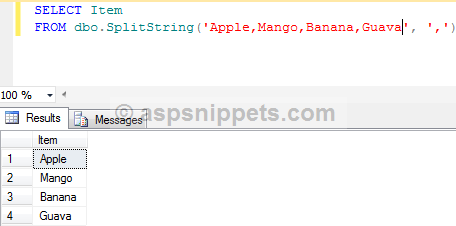
Split function in SQL Server Example: Function to Split Comma separated (Delimited) string in SQL Server 2005, 2008 and 2012
Using the Split String function in a Stored Procedure
The following stored procedure gets the records of Employees for which the Ids are passed using a string separated (delimited) by comma.
CREATE PROCEDURE GetEmployees
      @EmployeeIds VARCHAR(100)
AS
BEGIN
      SELECT FirstName, LastName
      FROM Employees
      WHERE EmployeeId IN(
            SELECT CAST(Item AS INTEGER)
            FROM dbo.SplitString(@EmployeeIds, ',')
      )
END
The stored procedure is executed as follows
EXEC GetEmployees'1,3,5,9'
Output
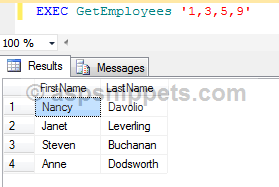
Split function in SQL Server Example: Function to Split Comma separated (Delimited) string in SQL Server 2005, 2008 and 2012


SQL


select  case when xtype='F' then 'Foreign Key' end Keys ,count(*) 'Number Of Forigen Key' from sysobjects group by xtype having xtype='f'

select  case when xtype='pk' then 'Primary Key' end Keys ,count(*) 'Number Of Primary Key' from sysobjects group by xtype having xtype='pk'

select  case when xtype='uq' then 'Unique Key' end Keys ,count(*) 'Number Of Unique Key' from sysobjects group by xtype having xtype='uq'

select  case when xtype='u' then 'Tables' end Tables ,count(*) 'Number Of Table' from sysobjects group by xtype having xtype='u'

select  case when xtype='v' then 'views' end Tables ,count(*) 'Number Of Views' from sysobjects group by xtype having xtype='v'

select  case when xtype='p' then 'Procedures' end [Procedures] ,count(*) 'Number Of Procedures' from sysobjects group by xtype having xtype='p'


SELECT TABLE_NAME,COUNT(COLUMN_NAME)  'Number Of Columns'

FROM INFORMATION_SCHEMA.COLUMNS 

group by TABLE_NAME

Having TABLE_NAME =any(select TABLE_NAME from INFORMATION_SCHEMA.COLUMNS)


select distinct t.name 'Table Name',SCHEMA_NAME(t.schema_id) 'Schema Name',i.rows 'Number Of Rows' from sysindexes i

join  sys.tables t on i.id=t.object_id order by t.name


Using below query we can know free space and used space in SQL DB.

SELECT DB_NAME() AS DbName, 
name AS FileName, 
size/128.0 AS UsedSpaceMB, 
size/128.0 - CAST(FILEPROPERTY(name, 'SpaceUsed') AS INT)/128.0 AS FreeSpaceMB 
FROM sys.database_files; 


ORACLE


SELECT table_name FROM user_tables ORDER BY table_name

SELECT table_name, owner FROM all_tables where TABLE_NAME like 'ELF%';

SELECT * FROM ALL_OBJECTS WHERE OBJECT_TYPE = 'PROCEDURE'

SELECT * FROM ALL_OBJECTS WHERE OBJECT_TYPE = 'FUNCTION'

SELECT * FROM ALL_OBJECTS WHERE OBJECT_TYPE = 'PACKAGE'

select * from all_constraints where r_constraint_name in(select constraint_name fromall_constraints where table_name like 'ELF_SALES_ORDER%') 


C (check constraint on a table)


P (primary key)


U (unique key)


R (referential integrity)


V (with check option, on a view)


O (with read only, on a view)

----


select  table_name, num_rows counter from all_tables where owner = 'owner' order by  table_name;

-----


Tables: select * from tab;

Views: select object_schema_name(v.object_id) schema_name, v.name from sys.view as v;

Procedures: select * from information_schema.routines where routine_type = ‘PROCEDURE’;

Functions: : select * from information_schema.routines where routine_type = ‘function;


-----


select count(*) from SYS.ALL_TABLES where owner=' ';


select count(* ) from SYS.ALL_INDEXES where owner=' ';


select count(*) from user_constraints where owner=' ';


SELECT * FROM ALL_OBJECTS WHERE OBJECT_TYPE IN ('FUNCTION','PROCEDURE','PACKAGE') and owner=’’;


select view_name from all_views where owner='';


owner name is DB user.


oracle

select count(* ) AS Indexes from SYS.ALL_INDEXES
select  count(*)  AS “Primary Key” from all_constraints where CONSTRAINT_TYPE='P'
select count(*)  AS “Check”  from all_constraints where CONSTRAINT_TYPE='C'
select count(*)  AS  “Unique Key”  from all_constraints where CONSTRAINT_TYPE='U'
select count(*)  AS  “Foreign Key”  from all_constraints where CONSTRAINT_TYPE='R'
select  table_name, num_rows as "Number Of Rows" from all_tables  order by  table_name;
select count(*) Views  from SYS.ALL_VIEWS
SELECT COUNT(*) as Procedure FROM ALL_OBJECTS WHERE OBJECT_TYPE = 'PROCEDURE'
SELECT COUNT(*) as "Functions" FROM ALL_OBJECTS WHERE OBJECT_TYPE = 'FUNCTION'
SELECT COUNT(*) Packages FROM ALL_OBJECTS WHERE OBJECT_TYPE = 'PACKAGE'


select count(*) from SYS.ALL_INDEXES  where owner='xx'
select  count(*)   from all_constraints where CONSTRAINT_TYPE='C' and owner='xx'
select count(*) Views  from SYS.ALL_VIEWS where owner='xx'
SELECT COUNT(*) as Procedure FROM ALL_OBJECTS WHERE OBJECT_TYPE = 'PROCEDURE' and owner='xx'
SELECT COUNT(*) as "Functions" FROM ALL_OBJECTS WHERE OBJECT_TYPE = 'FUNCTION' and owner='xx'
SELECT COUNT(*) Packages FROM ALL_OBJECTS WHERE OBJECT_TYPE = 'PACKAGE'  and owner='xx'
select  COUNT(*) from all_tables where owner='xx'
select  table_name, num_rows as "Number Of Rows" from all_tables where owner='xx' order by  table_name;


select * from ALL_JOBS where schema_user='xx'


--------------------------------------------------------------------


Transaction and Entity Framework 6

Entity Framework internally maintains a transaction when you call the SaveChanges() method. So all Inserts, update operations under a single save changes method call will be in a single transaction. But when you want to wrap multiple SaveChanges() methods under a single transaction there is not any built-in functionality in earlier versions of Entity Framework. 
Now, with Entity Framework 6.0, we have two built-in APIs for transactions:

DbContext.Database.BeginTransaction

This API call will allow us to begin a transaction for multiple save changes.  You can combine as many operations as you want under a single transaction and hence either all will be performed successfully then the transaction will be committed.  If any exception occurs then the transaction will be rolled back.

DbContext.Database.UseTransaction

Some times we need to use a transaction which is started outside of the entity framework. In this case this API call allows us to also use that transaction with Entity Framework. 
In this blog post, we are going to use Begin Transaction. In the future, I plan to write a separate blog post about how to use existing transaction with entity framework.
So enough theory, let's create a console application to understand it better.
ef6-with-transactions-console-application We need Entity Framework. So I have added it via nuget package.
entity-framework-transaction-nuget-package
In this application, we are going to use two model classes called category and product. We will save them both in single transaction and try to understand how transaction works with Entity Framework.
The category model is listed below:
namespace EFWithTransactions
{
    public class Category
    {
        public int CategoryId { get; set; }
        public string CategoryName { get; set; }
    }
}
Here is the product model:
using System.ComponentModel.DataAnnotations.Schema;
namespace EFWithTransactions
{
    public class Product
    {
        public int ProductId { get; set; }
        public string ProductName { get; set; }
        [ForeignKey("Category")]
        public int CategoryId { get; set; }
        public virtual Category Category { get; set; }
    }
}
Here you can see I have the category ID in Product an Product belongs to Category.  I have created my dbcontext class as shown below:
using System.Data.Entity;
namespace EFWithTransactions
{
    public class ProductDbContext : DbContext
    {
        public ProductDbContext()
            : base("ProductConnectionString")
        {
        }
        public DbSet<Category> Categories { get; set; }
        public DbSet<Product> Products { get; set; }
    }
}
The Main method of console application is displayed below, which illustrates a real scenario where an exception might occurs during multiple save changes().
using System;
namespace EFWithTransactions
{
    class Program
    {
        static void Main(string[] args)
        {
            using (ProductDbContext productDbContext = new ProductDbContext())
            {
                using (var transaction = productDbContext.Database.BeginTransaction())
                {
                    try
                    {
                        //saving category
                        Category category = new Category
                        {
                            CategoryName = "Clothes"
                        };
                        productDbContext.Categories.Add(category);
                        productDbContext.SaveChanges();
                        // Throw some error to check transaction
                        // Comment this to make transactions sucessfull
                        // throw new Exception("Custom Exception");
                        //saving product
                        Product product = new Product
                        {
                            ProductName = "Blue Denim Shirt",
                            CategoryId = category.CategoryId
                        };
                        productDbContext.Products.Add(product);
                        productDbContext.SaveChanges();
                        Console.Write("Cateogry and Product both saved");
                        transaction.Commit();
                    }
                    catch (Exception exception)
                    {
                        transaction.Rollback();
                        Console.WriteLine("Transaction Roll backed due to some exception");
                    }
                }
            }
            Console.ReadKey();
        }
    }
}