Friday, 21 November 2014

use of jquery data table in mvc

$(function () {
    getDataGridList();
 
});
function getDataGridList() {
    $('#baseDataTd').empty();
    var columns = 'PSASOfficeCode,PSASOfficeName,StateName,CityName,ContactNo';
    var baseDataTable = [];
    var i = 0;
    var check = "";
    $.getJSON('GetOffice', {}, function (data) {
        baseDataTable = $('<table id="baseDataTable" class="display" style="width: 100%;" ></table>');
        var row = $('<tr></tr>');
        //$(columns.split(',')).each(function () {
        //    row.append('<th>' + this + '</th>');
        //});
        row.append('<th>PSASOffice Code</th><th>PSASOffice Name</th><th>State Name</th><th>City Name</th><th>Contact No</th>');
        row.append('<th>Action</th>');
        baseDataTable.append($('<thead></thead>').append(row));
        $(data).each(function () {
            var cObj = this;
            row = $('<tr></tr>');
            $(columns.split(',')).each(function () {
                row.append('<td>' + cObj[this] + '</td>');
            });
            row.append('<td><img onclick=EditRecord(' + cObj["PSASOfficeCode"] + ') src="/Content/Images/Edit.png" style="cursor:pointer;" />&nbsp;<img onclick=DeleteRecord(' + cObj["PSASOfficeCode"] + ') src="/Content/Images/delete.gif" style="cursor:pointer;" /></td>');
            baseDataTable.append(row);
            i++;
        });
        $('#baseDataTd').empty().append(baseDataTable);
        baseDataTable.dataTable();
    });
}

Example of jquery on & delegate event handler

On
 $('body').on("click","#hcb", function () {
            $("input[name='cb']").attr("checked", this.checked);
        });

Delegate
 $(document).delegate("#ishcb", "click", function () {
            $("input[name='iscb']").attr("checked", this.checked);
        });

What are the new features introduced in c# 4.0?

This is very commonly asked c# interview question. This question is basically asked to check, if you are passionate about catching up with latest technological advancements. The list below shows a few of the new features introduced in c# 4.0. If you are aware of any other new features, please submit those using the from at the end of this post.

1. Optional and Named Parameters
2. COM Interoperability Enhancements
3. Covariance and Contravariance
4. Dynamic Type Introduction

What's the difference between IEnumerable and List ?

1. IEnumerable is an interface, where as List is one specific implementation of IEnumerable. List is a class.

2. FOR-EACH loop is the only possible way to iterate through a collection of IEnumerable, where as List can be iterated using several ways. List can also be indexed by an int index, element can be added to and removed from and have items inserted at a particular index.

3. IEnumerable doesn't allow random access, where as List does allow random access using integral index.

4. In general from a performance standpoint, iterating thru IEnumerable is much faster than iterating thru a List

Wednesday, 19 November 2014

how to save list of record in jquery

  $('#btnsubmit').bind("click", function () {
            var m = [];
            $('#ddlPageMaster option').each(function (i, j) {
                if ($(j).is(':selected')) {
                    m.push({ RolePageID: 0, RoleID: $('#ddlroleMaster').val(), PageID: $(j).val(), Active: $("input[name='rb']:checked").val() == 1 ? true : false });
                }

            });
             
            $.ajax({
                url: "@Url.Action("Save")",
                type: "post",
                contentType: "application/json; charset=utf-8",
                dataType: "json",
                data: "{ 'objBOAdmin': " + JSON.stringify(m) + "}",
                success: function ()
                {
                    alert('Data saved.');
                }
            });
        });

c# code
 public void Save(List<BOAdmin> objBOAdmin)
        {
            obBLAdmin.SaveRoleMaintenance(objBOAdmin);
        }

convert List to DataTable

public static class convertt
{
    public static DataTable ToDataTable<TSource>(this IList<TSource> data)
    {
        DataTable dataTable = new DataTable(typeof(TSource).Name);
        PropertyInfo[] props = typeof(TSource).GetProperties(BindingFlags.Public | BindingFlags.Instance);
        foreach (PropertyInfo prop in props)
        {
            dataTable.Columns.Add(prop.Name, Nullable.GetUnderlyingType(prop.PropertyType) ?? prop.PropertyType);
        }

        foreach (TSource item in data)
        {
            var values = new object[props.Length];
            for (int i = 0; i < props.Length; i++)
            {
                values[i] = props[i].GetValue(item, null);
            }
            dataTable.Rows.Add(values);
        }
        return dataTable;
    }
}
then call here

 public void SaveRoleMaintenance(List<BOAdmin> lstBOAdmin)
        {
            try
            {
                BLDataHelper oBLDataHelper = new BLDataHelper();
                oBLDataHelper.CreateDBObjects(BLDataHelper.Providers.SqlServer, BLDataHelper.Database.PSASMVC);
                DataTable dtrolemaintenance =convertt.ToDataTable<BOAdmin>(lstBOAdmin);
           
                SqlParameter sprolemaintenance = new SqlParameter("roledt", dtrolemaintenance);
                sprolemaintenance.SqlDbType = SqlDbType.Structured;
                oBLDataHelper.AddParameter("@roledt", dtrolemaintenance);
                oBLDataHelper.AddParameter("@mark", 1);
                object response = oBLDataHelper.ExecuteNonQuery("sp_RoleMaintenance", System.Data.CommandType.StoredProcedure);
            }
            catch
            {
                throw;
            }
        }

Tuesday, 18 November 2014

jQuery Multiselect Dropdown list with Checkboxes or Multiple Select Dropdown with Checkboxes

Introduction
   
Here I will explain jQuery multiselect dropdown list with checkbox using bootstrap multiselect plugin or multiple select dropdown with checkboxes in jQuery or dropdown with multiple checkbox options injQuery. Bootstrap Multiselect is a JQuery based plugin which converts a simple dropdown list to multiple select/multi-select dropdown with checkboxes.

Description
  
In previous posts I explained JavaScript send ampersand value in querystring
jQuery Change style of controlsjQuery Add fade in effect to webpagejQuery show html page content in popup window and many articles relating to JQuery. Now I will explain how to implement jQuery multiselect dropdown list with checkbox using bootstrap multiselect plugin.

To implement this functionality first create website and write following code in your aspx page


<html xmlns="http://www.w3.org/1999/xhtml">
<head>
<title>jQuery Multi Select Dropdown with Checkboxes</title>
<link rel="stylesheet" href="css/bootstrap-3.1.1.min.css" type="text/css" />
<link rel="stylesheet" href="css/bootstrap-multiselect.css" type="text/css" />
<script type="text/javascript" src="http://code.jquery.com/jquery-1.8.2.js"></script>
<script type="text/javascript" src="js/bootstrap-2.3.2.min.js"></script>
<script type="text/javascript" src="js/bootstrap-multiselect.js"></script>
</head>
<body>
<form id="form1">
<div style="padding:20px">
<select id="chkveg" multiple="multiple">
<option value="cheese">Cheese</option>
<option value="tomatoes">Tomatoes</option>
<option value="mozarella">Mozzarella</option>
<option value="mushrooms">Mushrooms</option>
<option value="pepperoni">Pepperoni</option>
<option value="onions">Onions</option>
</select><br /><br />
<input type="button" id="btnget" value="Get Selected Values" />
<script type="text/javascript">
$(function() {
$('#chkveg').multiselect({
includeSelectAllOption: true
});
$('#btnget').click(function() {
alert($('#chkveg').val());
})
});
</script>
</div>
</form>
</body>
</html>
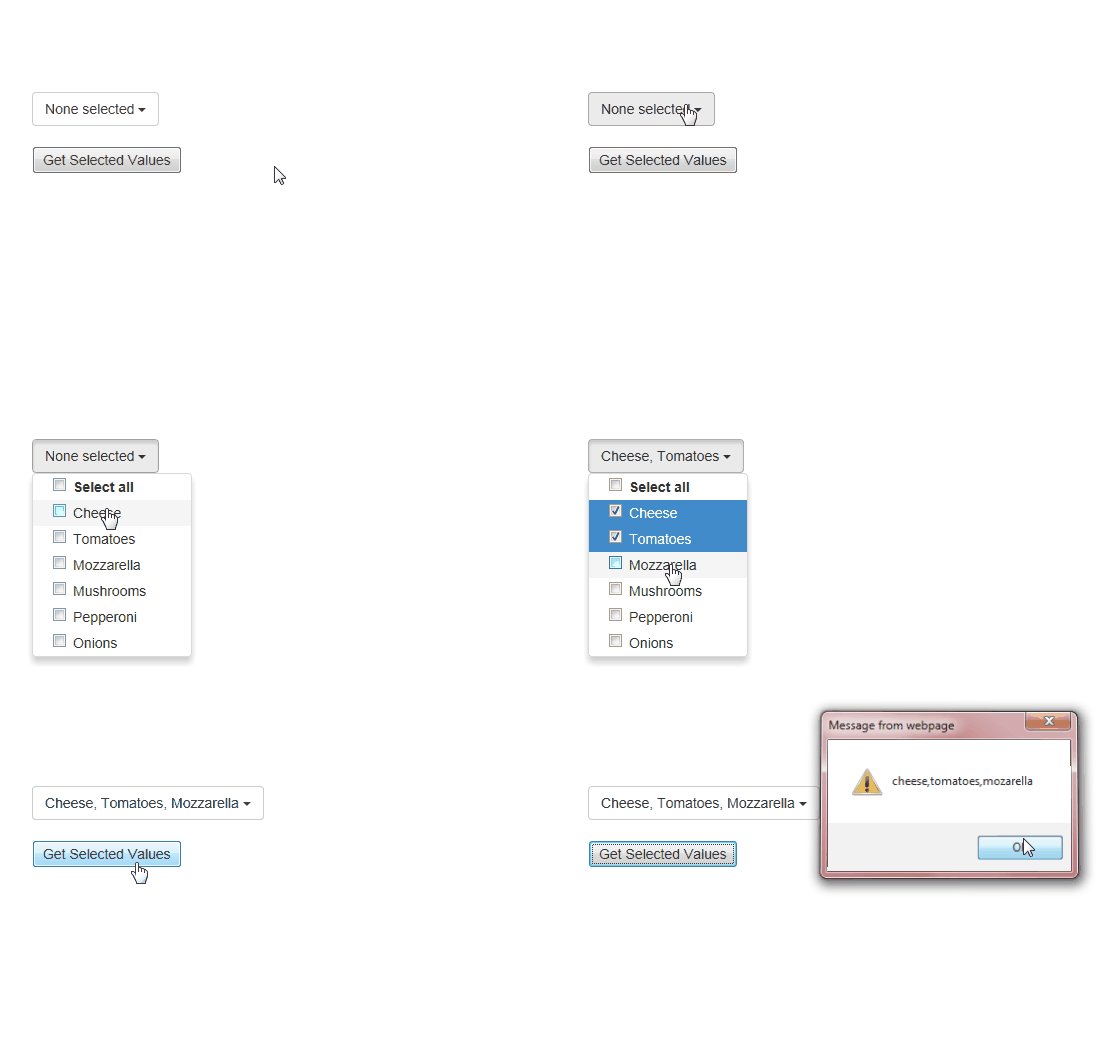
If you observe above code in header section I added js/bootstrap-2.3.2.min.js, js/bootstrap-multiselect.js and other files by using these files we can convert our dropdown to multi select dropdown with checkboxes. If you want these files you can get it from downloadable folder or get it from herebootstrap multiselect. If you observe script code in body tag I added like “$('#chkveg').multiselect()” to apply bootstrap multi select plugin to convert our dropdown to multi select options.

Once you completed all the coding run your application and check your output that will be like as shown below

Demo